
Yokogawa ADV151-E50 Digital Input Module 32 Channel 24VDC
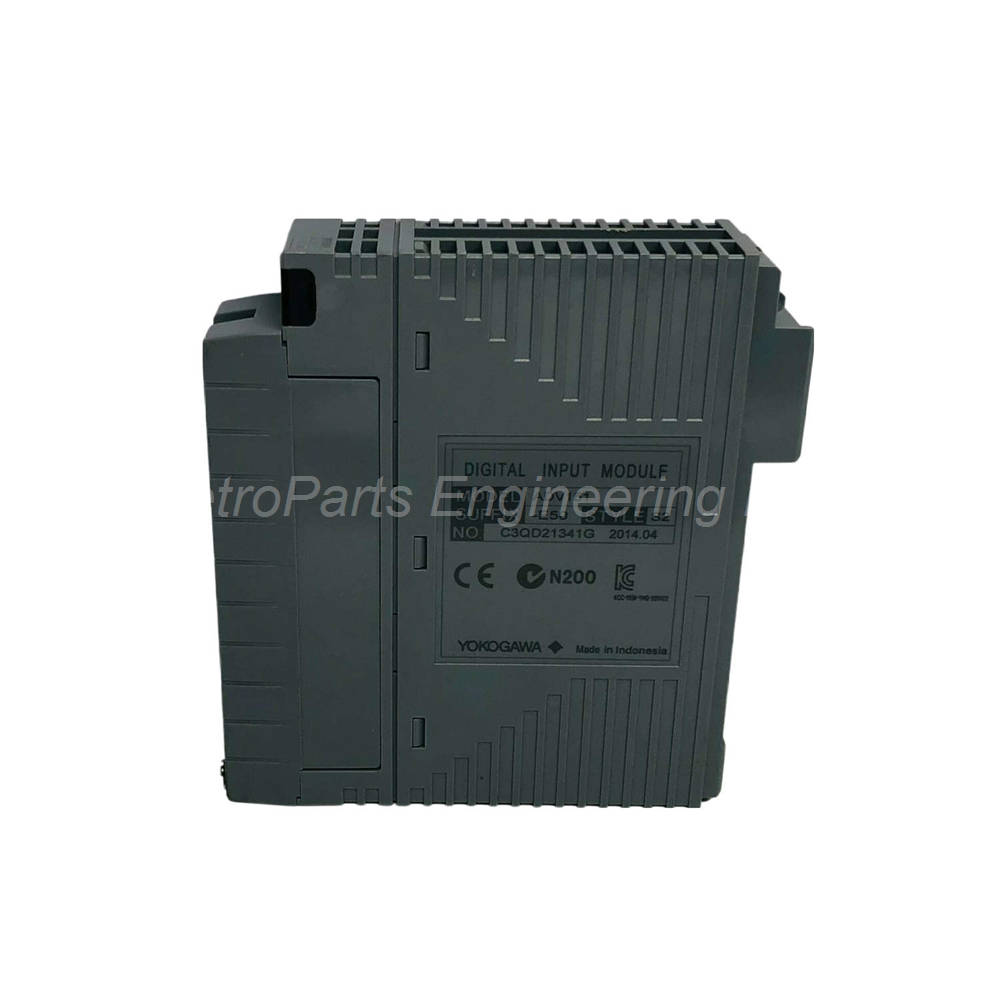


Introduction:
32-channel digital input module with SOE capture. 24 V DC sink/source operation. 8 ms response time. Basic type configuration.
 Customer Reviews
UBEST Automation – Trusted Global Automation Parts Supplier
We offer a wide range of in-stock industrial automation spare parts. All products come with a 12-month warranty and a 30-day refund for quality issues.
Product Attributes:
Notice: For real-time prices and inventory, please click the button below to contact us.
Module Design and Application
The Yokogawa ADV151-E50 is a digital input module from the ADV150 series. This module provides 32 channels for 24 V DC sink or source inputs. The rated input voltage is 24 V DC with an ON threshold of 18 to 26.4 V DC. Consequently, the ADV151-E50 accepts standard industrial digital signals from switches, sensors, and pushbuttons. The module supports three distinct input functions for versatile applications.
Model Breakdown Explanation
The model number ADV151-E50 reveals specific configuration details. The "E" indicates the module includes SOE (Sequence of Events) capture capability. "5" means no status display and no explosion protection. "0" specifies the basic type configuration. Therefore, this module suits standard industrial environments requiring high-speed event logging. The /D5A00 option adds a KS Cable Interface Adapter for 32-channel digital connections.
Input Functions and Capabilities
The ADV151-E50 offers three distinct input functions for different applications. Status input detects simple ON/OFF states for monitoring and control. Pushbutton input counts edge transitions for panel interface applications. SOE input captures time-stamped event data for sequence analysis. Consequently, one module handles multiple digital input requirements efficiently. The minimum ON detection time is 20 ms for pushbutton inputs, whereas the maximum ON/OFF cycle reaches 25 Hz.
Technical Specifications
General Specifications
Manufacturer: Yokogawa
Product Number: ADV151-E50
Product Type: Digital Input Module
Number of Input Channels: 32
Rated Input Voltage: 24 V DC (sink/source)
Weight: 0.30 kg
Suffix Code Breakdown
| Suffix Code | Option | Description |
|---|---|---|
| E | SOE Capture | With SOE capture capability |
| 5 | Status Display/Protection | Without status display; with no explosion protection |
| 0 | Type | Basic type |
| /D5A00 | Option | KS Cable Interface Adapter for 32-channel digital |
Input Voltage Specifications
| Parameter | Value |
|---|---|
| Input ON Voltage | 18 to 26.4 V DC |
| Input OFF Voltage | 5.0 V DC or less |
| Maximum Allowable Input Voltage | 30.0 V DC |
| Input Current (at rated voltage) | 4.1 mA ±20% per channel |
Withstanding Voltage
Between input signal and system: 2 kV AC for 1 minute
Between commons: 500 V AC for 1 minute (common every 16 channels)
Function Specifications
The Yokogawa ADV151-E50 supports multiple input functions.
| Function | Description | Performance |
|---|---|---|
| Status Input | Detects ON/OFF status | 8 ms response time or less |
| Pushbutton Input | Counts pushbutton edges | 20 ms minimum ON detection |
| SOE Input | Captures sequence of events data | High-speed time stamping |
Timing Specifications
Input Response Time: 8 ms or less (for status input)
Minimum ON Detection Time: 20 ms (for pushbutton input)
Maximum ON/OFF Cycle: 25 Hz (for pushbutton input)
Current Consumption
Maximum Current Consumption: 500 mA (5 V DC)
External Connection Options
Pressure clamp terminal
Dedicated cable (AKB331)
MIL connector cable
Installation Guide
Follow these steps to install the Yokogawa ADV151-E50 correctly.
Power Down System: First, disconnect power from the DCS backplane completely.
Mount Module: Next, insert the ADV151-E50 into the designated I/O slot.
Connect KS Adapter: Then, attach the KS Cable Interface Adapter if using option /D5A00.
Wire Field Devices: After that, connect digital field devices to the input channels.
Select Sink/Source: Meanwhile, configure each channel for sink or source operation as needed.
Restore Power: Finally, reapply power and verify the module status.
The ADV151-E50 requires proper configuration of sink or source wiring for each channel. Therefore, verify your field device type before finalizing connections. In addition, ensure the input voltage stays within the 18 to 26.4 V DC ON range. Consequently, proper installation ensures reliable digital signal acquisition.
Package List
The package includes the following physical items.
Yokogawa ADV151-E50 digital input module (1 piece)
KS Cable Interface Adapter (/D5A00 option if ordered)
Product label with part number and suffix codes
Anti-static protective bag for safe transport
Note: Field wiring and external cables (AKB331, MIL) are not included. Terminal boards are sold separately. No calibration certificate is provided with this module.
Frequently Asked Questions (FAQ)
1. How many channels does the ADV151-E50 provide?
The Yokogawa ADV151-E50 provides 32 digital input channels. Therefore, a single module monitors up to 32 field devices. Each channel accepts 24 V DC sink or source signals. Consequently, the module suits medium to large digital I/O applications.
2. What is SOE capture on the ADV151-E50?
SOE capture stands for Sequence of Events recording on the Yokogawa ADV151-E50. Therefore, this module time-stamps input state changes with high precision. The "E" suffix code enables this feature. Consequently, the module is ideal for fault analysis and event sequence reconstruction.
3. What is the input response time of the ADV151-E50?
The Yokogawa ADV151-E50 has an input response time of 8 ms or less for status input. For pushbutton input, the minimum ON detection time is 20 ms. The maximum ON/OFF cycle reaches 25 Hz. Therefore, the module captures fast digital signals accurately.
4. What is the difference between sink and source wiring?
Sink wiring connects the field device between the input and ground, whereas source wiring connects it between the input and positive voltage. The Yokogawa ADV151-E50 accepts both configurations per channel. Therefore, you can mix sink and source devices on the same module. Consequently, wiring flexibility is significantly enhanced.
5. What is the maximum allowable input voltage for the ADV151-E50?
The Yokogawa ADV151-E50 accepts a maximum allowable input voltage of 30.0 V DC. Therefore, the module tolerates moderate overvoltage without damage. The input current at rated voltage is 4.1 mA ±20% per channel. Consequently, the module is protected against typical industrial voltage fluctuations.
6. What is the withstanding voltage rating of the ADV151-E50?
The Yokogawa ADV151-E50 provides 2 kV AC isolation between input signals and system for one minute. Between commons, the rating is 500 V AC for one minute per 16-channel group. Therefore, the module offers excellent noise immunity. Consequently, it suits installations with high electrical interference.
7. What external connection options are available for the ADV151-E50?
The Yokogawa ADV151-E50 supports three external connection methods. These include pressure clamp terminals, dedicated AKB331 cable, and MIL connector cable. The /D5A00 option adds a KS Cable Interface Adapter as well. Therefore, you can choose the best wiring method for your cabinet layout.
Related Accessories
Enhance your digital input system with these compatible parts.
Terminal Board: Yokogawa compatible terminal board for pressure clamp connections
Dedicated Cable: Yokogawa AKB331 for module-to-terminal board connection
MIL Connector Cable: Yokogawa MIL cable for alternative wiring method
KS Cable Adapter: Yokogawa /D5A00 for 32-channel digital connections
Mounting Base: Yokogawa ADV151 compatible backplane for module installation
Always use genuine Yokogawa components with the ADV151-E50. Therefore, third-party cables may cause connection errors or signal degradation. In addition, verify sink/source configuration before wiring. Consequently, using authentic parts ensures optimal module performance and system reliability.