
Allen-Bradley 1794-AENT Ethernet Adapter | Flex I/O
Introduction:
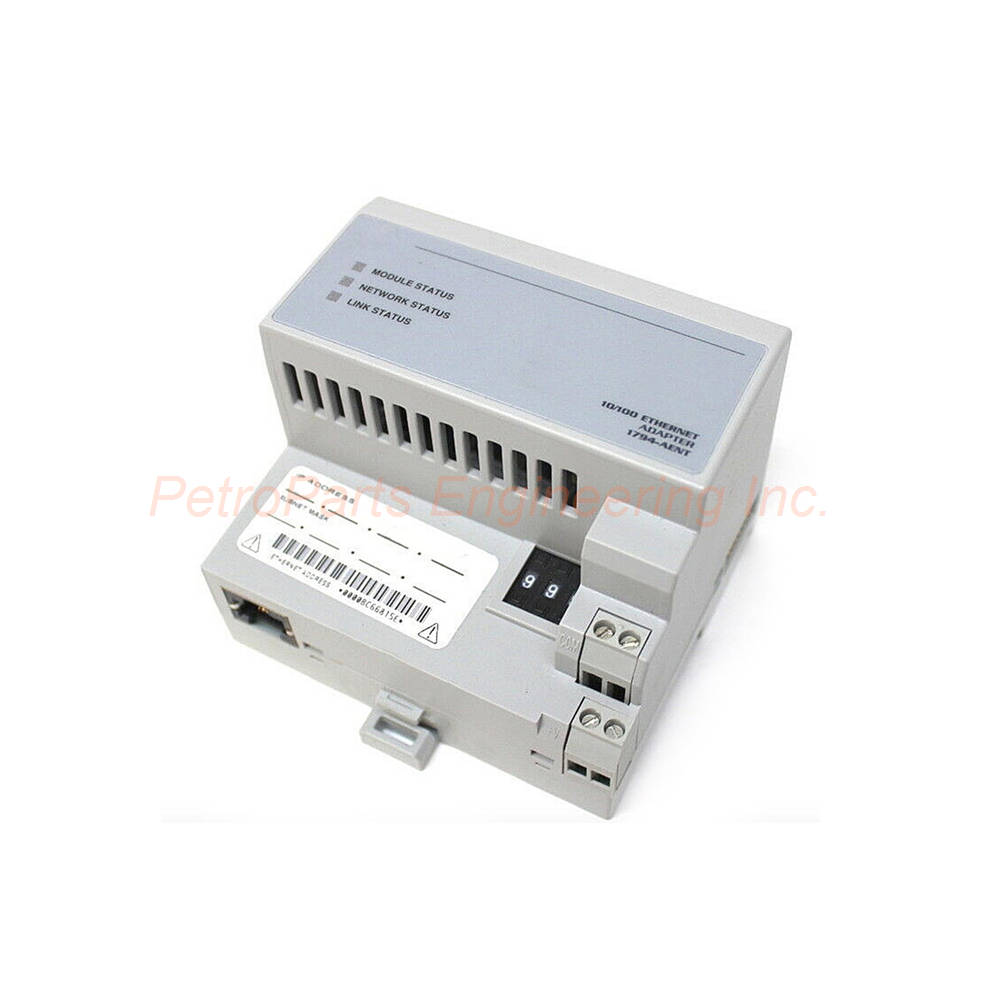
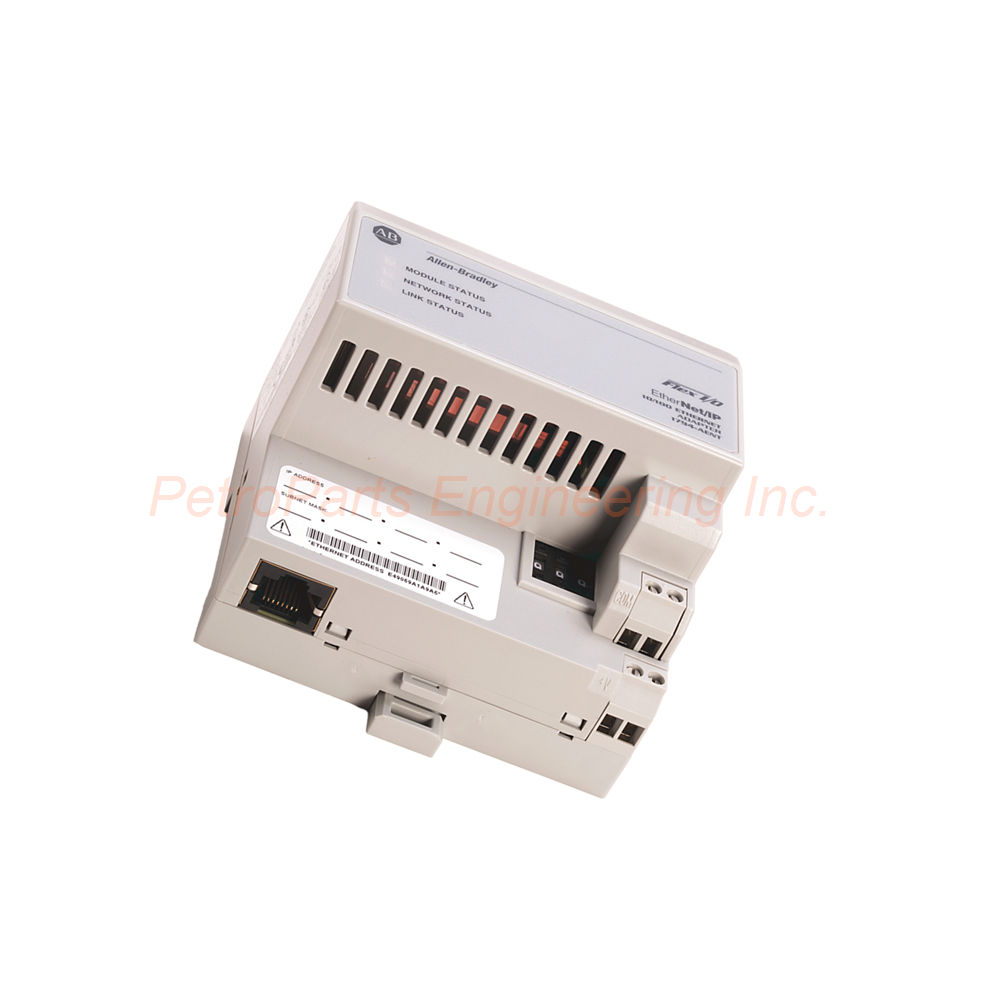
The Allen-Bradley 1794-AENT is an Ethernet/IP communication adapter for Flex I/O systems. Supports 8 modules, 10/100 Mbps, and linear topology for distributed I/O.
 Customer Reviews
UBEST Automation – Trusted Global Automation Parts Supplier
We offer a wide range of in-stock industrial automation spare parts. All products come with a 12-month warranty and a 30-day refund for quality issues.
Product Attributes:
Notice: For real-time prices and inventory, please click the button below to contact us.
Allen-Bradley 1794-AENT Ethernet/IP Adapter for Flex I/O Systems
The Allen-Bradley 1794-AENT is a Flex I/O communication adapter from Rockwell Automation. This adapter enables a Flex I/O rack to connect to an Ethernet network. Specifically, the 1794-AENT exchanges data with Ethernet enabled controllers. Engineers use this adapter for distributed I/O architecture in industrial automation. The Flex I/O product family offers a compact and cost-effective solution.
Product Overview and Functionality
The 1794-AENT allows installation of up to eight (8) Flex I/O modules. It specifically supports discrete input and output modules. Analog input and output modules also work with this adapter. The adapter connects Ethernet/IP enabled controllers to FLEX I/O. Controllers like CompactLogix and ControlLogix integrate seamlessly.
Communication Port and Protocol
The communication port provides one (1) RJ45 Ethernet connection. This port supports the Ethernet/IP protocol for industrial networking. Use standard RJ45 Cat.5 cables for network connections. The data transfer speed reaches 10 to 100 Mbps for flexible operation. Auto-negotiation selects the appropriate speed automatically.
Supported Topology
The 1794-AENT supports linear topology for network layout. This topology simplifies wiring in many applications. Devices connect in a daisy-chain fashion along the line. Consequently, no additional switches are needed for small networks.
Network Address Configuration
The network address configures using thumbwheel switches provided on the module. Alternatively, a DHCP server can assign the address automatically. By default, the adapter switches are set at 999. Adjust these switches to match your network addressing scheme. The minus (-) and plus (+) buttons make address changes simple.
Status Indicators
Three status indicators help users monitor module operation. A red/green Module Status indicator shows adapter health. A red/green Network Status indicator shows Ethernet/IP connection status. A green Link Status indicator shows physical cable connection. Use these LEDs for quick troubleshooting.
Mounting Options
The 1794-AENT mounts on a DIN rail for easy installation. Use a zinc-plated yellow-chromate steel DIN rail for proper grounding. DIN rails made of other materials may cause improper grounding. The module can also be mounted on a wall if needed. The enclosure has an open-style rating (none).
Physical Dimensions and Weight
The module measures 87 x 94 x 92 mm (3.4 x 3.7 x 3.6 inches). The weight reaches 227 g (8.01 oz) for the unit alone. These compact dimensions save valuable cabinet space. Multiple modules fit into a small footprint area.
I/O Capacity and Compatibility
The 1794-AENT supports up to 8 I/O modules in the Flex I/O rack. Compatible terminal base units include the 1794-TB3G and 1794-TB3GS. The adapter acts as remote I/O for several controller platforms. PLC5, SLC500, CompactLogix, and ControlLogix all work with this module.
Power Requirements
The nominal input voltage rating is 24 Volts DC. The input voltage range spans from 19.2 to 31.2 Volts DC. This range includes an AC ripple of 5%. The current draw reaches 450 mA at a 24 VDC power supply. Maximum power consumption reaches 550 mA maximum, with 440 mA typical at 24V DC.
FlexBus Output Current
The module provides a FlexBus output current of 640 mA maximum. This power supplies all connected Flex I/O modules. Each I/O module draws power from this FlexBus. Ensure your total I/O power draw stays below 640 mA.
Power Dissipation and Thermal Dissipation
Maximum power dissipation reaches 7.3 W at 19.2 Volts DC. Thermal dissipation reaches 24.9 BTU/hour at 19.2 Volts DC. Consequently, account for this heat in your enclosure cooling calculations. Proper ventilation ensures reliable long-term operation.
Isolation Voltage
The continuous isolation voltage reaches 50 Volts for circuit separation. This isolation protects against ground loops and minor voltage spikes. Your system gains basic protection between power and communication circuits.
Wire Size and Termination
The recommended wire size ranges from 0.34 to 2.5 mm² (22 to 12 AWG). Use stranded copper wire rated at 75 °C (167 °F) or higher. Maximum insulation thickness measures 1.2 mm (3/64 inch). The recommended terminal screw torque is 0.8 Nm (7 lb-in) for reliable connections.
Operating Temperature Range
The operating temperature ranges from 0 to 55 °C (32 to 131 °F). For storage, the temperature spans -40 to 85 °C (-40 to 185 °F). These ratings suit most indoor industrial environments. Avoid installing near heat sources or in direct sunlight.
Vibration and Shock Ratings
The vibration rating reaches 5 g at 10 to 500 Hz per IEC 68-2-6. The operating shock rating reaches 30 g peak acceleration. The pulse width measures 11 (+1) ms for shock events. These ratings ensure reliable operation in vibrating machinery applications.
Controller Compatibility
The 1794-AENT acts as remote I/O for several controller platforms. PLC5 and SLC500 controllers work with this adapter. Logix controller platforms such as CompactLogix and ControlLogix integrate seamlessly. This wide compatibility makes the module very versatile.
Recommended Applications
The 1794-AENT suits several application types. Use it when your application requires internet or intranet connection. It works well for plant management and material handling applications. Time-critical applications with no established schedule benefit from this adapter. Configuration, data collection, and control on a high-speed single network work excellently. Applications requiring data sent regularly also suit this module.
Power Supply Compliance
Make sure to use a power supply compliant with Protected Extra Low Voltage (PELV). Alternatively, use Safety Extra Low Voltage (SELV) for compliance. This ensures compliance with the CE Low Voltage Directive (LVD). Your system safety improves with proper power supply selection.
Step-by-Step Installation Guide
Follow these steps to install your Allen-Bradley 1794-AENT correctly.
Step 1: Select the Mounting Location
First, choose a location with adequate clearance for DIN rail mounting. Use zinc-plated yellow-chromate steel DIN rail for proper grounding. Ensure ambient temperature stays between 0 and 55 °C. Then, verify the mounting surface can support the 227 g weight.
Step 2: Set the Network Address
Next, locate the thumbwheel switches on the 1794-AENT module. Set the desired node address between 00 and 99. If using DHCP, leave switches at 999 for default. The minus (-) and plus (+) buttons make address changes simple.
Step 3: Mount the Adapter
Now, attach the 1794-AENT to the DIN rail by snapping it into place. Position it as the leftmost module in your Flex I/O rack. The adapter serves as the communication gateway for all I/O modules. Then, mount additional Flex I/O modules to the right of this adapter.
Step 4: Connect Ethernet Cable
Wire the RJ45 Cat.5 Ethernet cable to the 1794-AENT communication port. Connect the other end to your Ethernet/IP network switch or controller. Ensure the cable clicks securely into the RJ45 port. The Link Status LED should illuminate when connected.
Step 5: Connect Power Supply
Wire the 24 V DC power supply to the 1794-AENT power terminals. Use 0.34 to 2.5 mm² stranded copper wire rated at 75°C or higher. Tighten terminal screws to 0.8 Nm (7 lb-in) torque. Verify the voltage stays between 19.2 and 31.2 V DC.
Step 6: Verify Communication
Apply power to the 1794-AENT and observe the status LEDs. The Module Status LED should indicate normal operation. The Network Status LED should show established connection. Then, configure your controller to recognize the remote I/O rack. Verify data exchange with all eight I/O modules.
Complete Package Contents
Your Allen-Bradley 1794-AENT shipment includes the following items:
Allen-Bradley 1794-AENT Ethernet/IP Adapter Module (1 unit)
Product documentation and installation manual
Terminal blocks for power connections
Thumbwheel switch adjustment tool
Note: Shipping partners include FedEx, UPS, and DHL.
Frequently Asked Questions (FAQ)
Q1: How many Flex I/O modules can the 1794-AENT support?
The 1794-AENT supports up to 8 Flex I/O modules of any combination. This adapter must sit as the leftmost module in the rack. All I/O modules connect to the right of this adapter.
Q2: What communication rates does the 1794-AENT support?
The Allen-Bradley 1794-AENT supports 10/100 Mbps communication rates. The adapter auto-negotiates the appropriate speed with the network. Both half-duplex and full-duplex modes are supported.
Q3: What topology does the 1794-AENT support?
The 1794-AENT supports linear topology for network layout. Devices connect in a daisy-chain fashion along the line. No additional switches are needed for small network installations.
Q4: Can the 1794-AENT be used with CompactLogix controllers?
Yes, the 1794-AENT works perfectly with CompactLogix controllers. It also works with ControlLogix, PLC5, and SLC500 platforms. The adapter acts as remote I/O for all these controller types.
Q5: What is the FlexBus output current rating of this module?
The 1794-AENT provides 640 mA maximum FlexBus output current. This power supplies all connected Flex I/O modules at 5 Volts DC. Ensure your total I/O power draw stays below this rating.
Welcome to learn about our business. We are a leading global provider of automation equipment and will provide you with complete and cost-effective product solutions. You are welcome to choose us, and our services will make you a long-term partner like our other customers.
Now please let us know your needs and suggestions.
About Ubest
Ubest Automation is a leading global provider of automation products, with deep partnerships with major automation manufacturers to provide customers with customized business solutions, cost-effective products, and comprehensive services.
Product Center
Contact Us
Phone:+86 180 3000 5825
Address:Room 7A, No. 59 Hubin North Road, Siming District Xiamen City China
Email: [email protected]
Contact: Klaus
Industry Links
© 2026, Ubest Automation Limited All Rights Reserved. sitemap